The engine inside PadForge

Virtual controllers.
Real identity.

Pick a controller profile. Every gaming API sees the exact identity of real hardware, down to the bus type.

A virtual Xbox Series X|S Bluetooth controller shown identically in Device Manager, joy.cpl, Chrome Gamepad Tester, and PadForge/SDL3
The engine inside PadForge
231 device profiles
~35 µs measured latency
MIT licensed. Commercial use welcome.

What it is

There are shims.
And there is HIDMaestro.

A C# SDK and a matching user-mode driver. Your code picks a profile, and the game on the other side sees the real thing.

See all 28 capabilities
Exact hardware identityVID/PID, strings, descriptors, layout, and the bus type itself
231 device profilesXbox 360 to HOTAS, every one a JSON file
~35 µs measured latency10,000 iterations, reproducible with one command
Every gaming API at onceDirectInput, XInput, SDL3, browser, WGI, RawInput
Native on ARM64 WindowsOne DLL holds both driver sets and installs the matching one
Valve personas Steam recognizesThe Steam Deck and both Steam Controllers, filed as Valve hardware
A Switch Pro that answers backThe Nintendo handshake, answered over real Bluetooth
Controller audio and hapticsThe pad's speaker, microphone, and voice-coil endpoints
Virtual VR controllersTwo hands SteamVR promotes to real roles
Force feedback answeredHID PID for DirectInput games, rumble raised to your code
Self-bootstrapping installNo EV certificate, no test-signing mode, no reboot
Hot-plug in ~200 msCreate, live-swap, and remove, with no leftover devices
Six-plus controllers at onceCorrect per-controller order on every API
A 60-scenario batteryStock SDL and the Steam client are among the judges

IDENTITY

The game sees the controller you chose, down to the bus.

Identity

Not a lookalike. The same device.

A Bluetooth controller reports as Bluetooth, not as a USB device wearing its name. SDL3 matches it, Steam recognizes it, Chrome identifies it, joy.cpl shows the right name.

Xbox to HOTAS, out of the box
Embedded profiles across 46 vendors: Xbox 360, Xbox Series, DualSense, Thrustmaster, Logitech, flight sticks, racing wheels, and more. Every controller is a JSON file. Adding support for a new one means writing JSON, not modifying code.
Steam sees a Steam Deck
Three composite personas present the whole USB device a real Valve controller presents: the Steam Deck's controller with all five interfaces from a real unit's lsusb dump, the wired 2015 Steam Controller with every descriptor verbatim, and the 2026 Steam Controller. Steam files them under its own hardware rather than Generic DirectInput, and each packs its own wire format cross-checked against SDL's decoders.
A Switch Pro that answers back
The Switch Pro Controller is not a passive device: hosts drive a Nintendo subcommand handshake and stall without a device that answers. HIDMaestro's driver answers it over the real Bluetooth wire, with a descriptor extracted byte-exact from a live Pro's SDP cache: SPI calibration reads, input-mode switch, 60 Hz full-mode streaming with gyro and accel. SDL3 and Steam Input bind it as a real Bluetooth Pro Controller with motion and rumble.
The speaker, the mic, and the actuators
A real USB DualSense is a four-interface composite, and three profiles present all four. Windows gets the pad's own Speakers and Headset Microphone endpoints, and the 4-channel stream behind them carries the speaker on channels 1 and 2 and the voice-coil actuators on 3 and 4. That stream is the only path on Windows by which a game hands a controller its authored haptic waveforms. It reaches your code as UsbAudio.Output with each channel's role named. Nothing extra to install: the USB transport ships inside the DLL and deploys itself the first time you create one.
Your controller, or one that never existed
Clone a DualSense and ship a 16-button variant that Windows, Steam, and games still see as a DualSense. Build a flight stick, racing wheel, or arcade panel from scratch with arbitrary VID/PID, axis count, button count, and resolution. Or point HMDeviceExtractor at any controller you have plugged in and get a ready-to-deploy profile back.
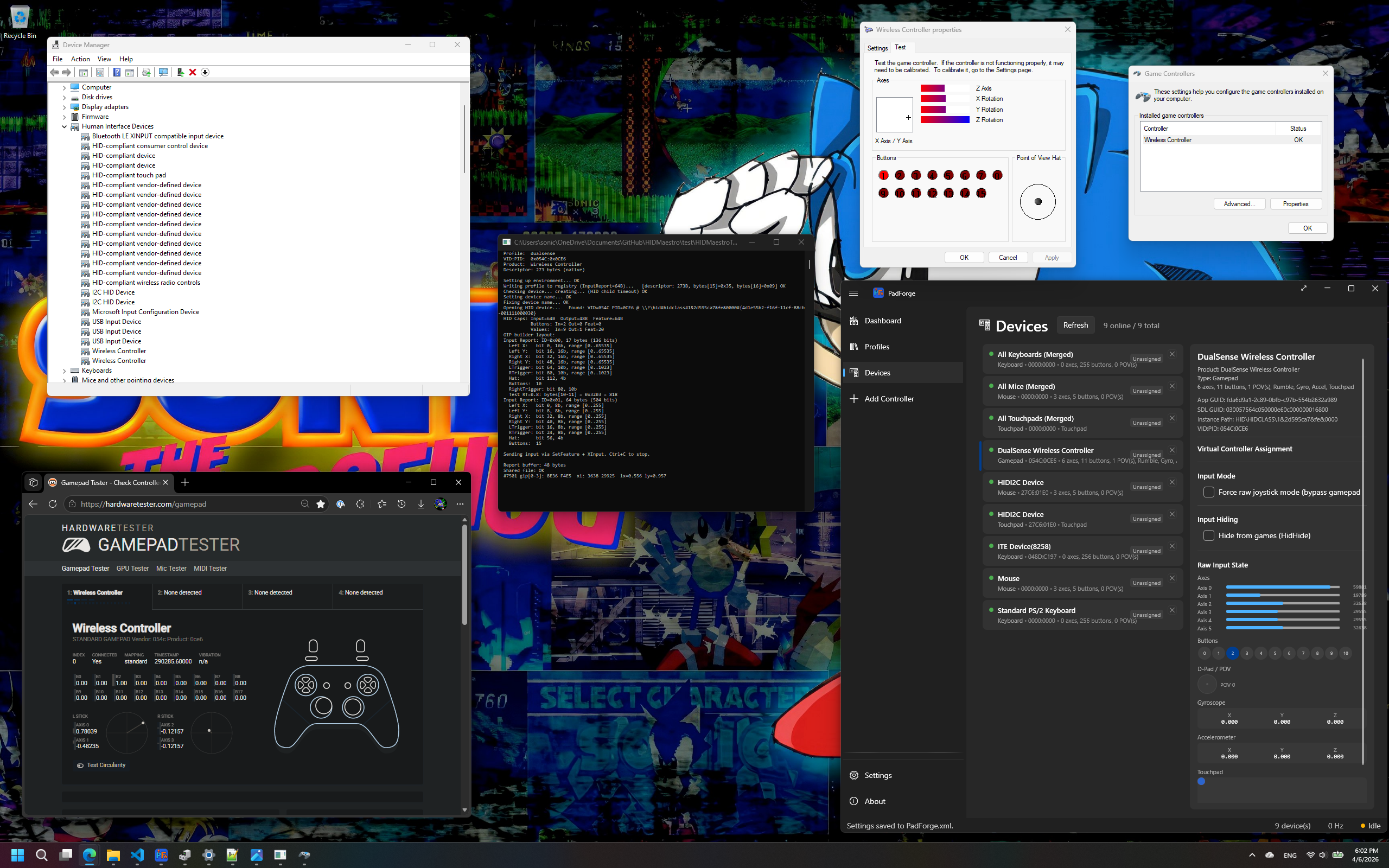
A virtual DualSense shown identically in Device Manager, joy.cpl, Chrome Gamepad Tester, and PadForge/SDL3
Four windows, one device
231
Device profiles
~35µs
Median single-press
60
Battery scenarios
0
Kernel drivers for standard profiles

ADOPTED

PadForge drives the whole surface. Other projects build on the parts they need.

Other people ship it.

PadForge uses HIDMaestro for virtual controller output. It is built on this SDK end to end and drives more of the surface than any other consumer: every profile family, live profile swapping, multi-controller slots, force feedback, controller audio and haptics, the Valve personas, and the virtual VR controllers. Its Softpedia listing is an Editor's Pick at 5.0 out of 5.

LizardByte's libvirtualhid, from the organization behind Sunshine, reuses this project's force-feedback descriptor byte for byte and says so in its own source: "HIDMaestro's MIT-licensed MinimumViablePidFfbBlock, byte-for-byte." Their header calls the layout the subset of the PID descriptor proven by HIDMaestro, and their alternatives table lists it beside ViGEmBus, inputtino and WinUHid.

See it running in PadForge
PadForgeThe flagship. Every capability this SDK ships, in one app
foundation-sunshineA Sunshine fork whose DualSense support is built on HIDMaestro
JoystickGremlinExA flight-sim remapper driving the SDK from Python over pythonnet
NearcadePins the SDK as a submodule for its remote-play bridge
dualsense-commandBundles the runtime in its bridge installers
FlexInputUses HIDMaestro as its default virtual-device backend
DirectXInputShips the runtime with its controller tooling

SPEED

Shared memory on one machine, measured in microseconds.

Latency

Lower latency, measured.

Real propagation over 10,000 single-press iterations, reproducible with one command. See the methodology.

35µs
Median single-press input
0.15ms
Rumble and FFB, event-driven
No socket. No batching cap.
Standard profiles use shared memory between the SDK and UMDF2 drivers, with input and output signaled per packet. Composite profiles use the bundled USB/IP transport over a local loopback connection.
VIIPER's number excludes its own network
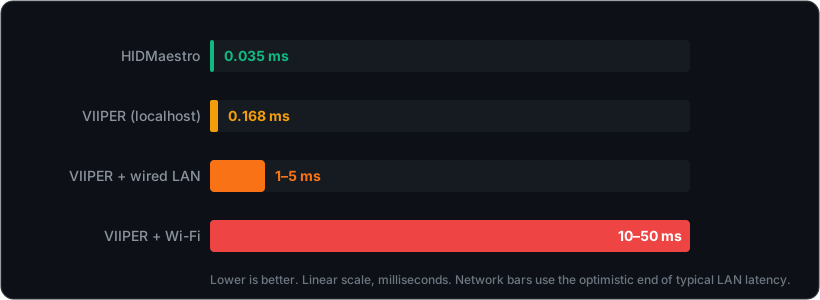
VIIPER's published Windows figure, 168 µs, is localhost-only. Running it over an actual network, the thing the project is named for, adds roughly 1 to 5 ms on wired LAN or 10 to 50 ms over Wi-Fi on top of that figure, a caveat its docs mention only in passing. It also batches reports every millisecond, capping the update rate at 1000 Hz. HIDMaestro's input is event-driven with no fixed cap.
Networking belongs in the application
Standard profiles keep controller traffic in shared memory. Composite profiles use local USB/IP. Applications can add network sharing above the SDK, as PadForge does with Remote Link.
Live in about a second
When the installed driver already matches, InstallDriver() completes in ~40-60 ms and a consumer goes from process start to a live controller in about a second. If the consuming app is force-closed mid-session, the next launch evicts the orphaned devices and has the first controller live again in ~2.3 s, measured with an Xbox Series BT profile in the mix, the deepest teardown stack.
Input latency, lower is better: HIDMaestro 0.035 ms versus VIIPER at 0.168 ms localhost, 1 to 5 ms over wired LAN, and 10 to 50 ms over Wi-Fi
The network bars use the optimistic end of each LAN range. Even granting VIIPER the best case, its Wi-Fi path runs hundreds of times longer than HIDMaestro's shared-memory path.

EVERYWHERE

One device, and every API Windows has sees it at once.

Every API

One device.
Every gaming API.

DirectInput sees correct axes and buttons. XInput sees separate triggers in one slot. The browser sees a STANDARD GAMEPAD. WGI sees one Gamepad. All at the same time.

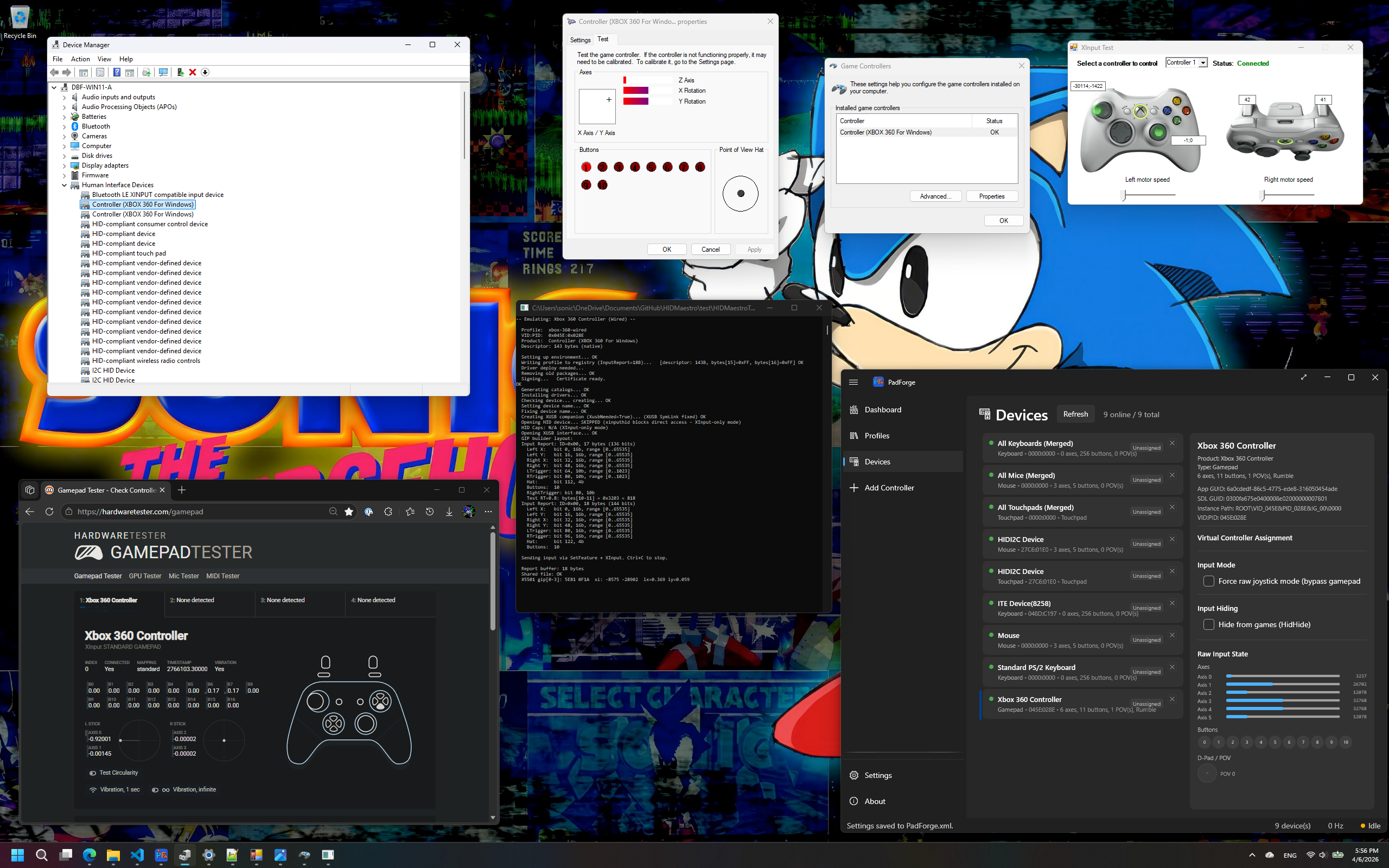
A virtual Xbox 360 Wired controller shown identically in Device Manager, joy.cpl, Chrome Gamepad Tester, and PadForge/SDL3
Same VID, same name, same bus
60 regression scenarios
A 60-scenario regression battery covers DirectInput, XInput, SDL3, stock upstream SDL, the Steam client, the browser Gamepad API, WGI, the battery reply a pad gives XInput, and the device identity of every family across nine lives. A real Xbox Series X|S Bluetooth controller tested side by side shows byte-identical behavior across the HID class APIs.
Six pads, every API, correct order
No hard limit on simultaneous virtual controllers. Tested with 6 mixed types, correct per-controller ordering across every API. XInput caps Xbox-family profiles at its own 4 slots; non-Xbox profiles run beyond it.
Create, swap, and remove live
Create and remove controllers on the fly, about 200 ms for a single controller. Live-swap a controller's profile mid-session. No reboots, no leftover devices.
FFB games get their answers
HID PID 1.0 answers for DirectInput force-feedback games, plus rumble and haptic output events the consumer routes to real hardware. The driver accepts the writes and raises them to your application in real time.
Two hands for SteamVR
An embedded OpenVR driver presents a left and a right hand to SteamVR. The hands hold real SteamVR hand roles, serve the modern input system through a full input profile, and serve legacy GetControllerState readers through a shipped legacy binding. Controllers exist only while a consumer is live, so an idle machine shows no phantom devices.

Three calls

The whole lifecycle is one page of C#.

Reference one DLL, install the driver, create a controller. The game on the other side sees an Xbox 360 pad indistinguishable from the real thing.

Reference the SDK
One DLL, HIDMaestro.Core.dll, with the 231-profile catalog, the driver binaries for x64 and ARM64, and the signing tools embedded. Grab it from a release ZIP or build from source.
Install the driver
InstallDriver() is self-bootstrapping: it creates a locally trusted certificate, signs the driver, and installs it. No EV certificate, no test-signing mode, no reboot. When the installed driver already matches, the call completes in ~40-60 ms.
Create and drive
Pick a profile, call CreateController, submit input. A single controller is live in about 200 ms. Dispose it and the device disappears, with no leftover PnP state.
using var ctx = new HMContext();
ctx.LoadDefaultProfiles();
ctx.InstallDriver();
using var ctrl = ctx.CreateController(
    ctx.GetProfile("xbox-360-wired")!);
ctrl.SubmitState(new HMGamepadState { Buttons = HMButton.A });

Compare

How it stacks up.

Against the tools people usually reach for. Every row is a capability you can check yourself.

Capability HIDMaestro VIIPER ViGEmBus vJoy
Kernel driver requiredNo, except the composite USB personasYes (USBIP)YesYes
Exact identity, incl. Bluetooth busYes, 231 profilesUSB only2 fixed typesFixed identity
Add a new deviceJSON, or capture one you ownWrite Go per deviceN/AN/A
Local single-press latency~35 µs measured168 µs publishedN/AN/A
StatusActiveActiveRetiredStale

The full specification

Every capability HIDMaestro ships, grouped and stated plainly, including the complete comparison table and the questions people ask.

View specifications

See it

The same controller,
everywhere Windows looks.

Xbox Series BT
Xbox Series X|S BluetoothDevice Manager, joy.cpl, Chrome Gamepad Tester, and PadForge/SDL3.
Xbox 360 Wired
Xbox 360 WiredOne XInput slot, separate triggers, ten buttons.
DualSense PS5
DualSenseSony's identity, straight through to the browser.

Built to be built on.

A developer platform: a C# SDK and a matching user-mode driver. Clone the repo or grab a release. MIT licensed, free forever.

v1.9.0 adds ARM64 Windows. Each release has an x64 ZIP and an ARM64 ZIP, and HIDMaestro.Core.dll is the same file in both. Read what was measured on each.

One DLLx64 and ARM64MIT
Prerequisites
Windows 10/11 on x64 or Windows 11 on ARM64, .NET 10, and administrator privileges for virtual device creation. Source builds need Visual Studio C++ tools for x64 and ARM64 and Windows SDK/WDK 10.0.26100.0. Platform support and validation.
Not a developer?
If you want to use HIDMaestro through a UI instead of code, install PadForge. It wraps this SDK with a full input-mapping app.

There is no tip jar. Knowing HIDMaestro is useful is reward enough. If you insist on giving something, give it to a charity instead and bless humanity. Short of one you already trust, Humanitarian Services of The Church of Jesus Christ of Latter-day Saints puts it to work directly, and give.org grades charities against twenty standards if you would rather choose your own.

The upstream projects HIDMaestro is built on have earned it as much as anyone. They made all of this possible.

Anonymously, preferably. Not at all is fine too, and nothing here changes either way.

An invitation

“And we talk of Christ, we rejoice in Christ, we preach of Christ, we prophesy of Christ, and we write according to our prophecies, that our children may know to what source they may look for a remission of their sins.”

2 Nephi 25:26

Glory, honor, and praise to the Lord Jesus Christ, the source of all truth and salvation, forever and ever.